量子アルゴリズム:Grover探索とその応用
Atsushi Matsuo(2024年5月10日)
元の講義のPDFをダウンロードできます。コードスニペットは静止画像のため、一部が非推奨になっている可能性があります。
この実験を実行するおおよそのQPU時間は2秒です。
1. Groverのアルゴリズム入門
このノートブックは、量子コンピューティングにおけるユーティリティへの道に関する講義シリーズの第4回です。ここでは、Groverのアルゴリズムについて学びます。
Groverのアルゴリズムは、古典的な探索手法に対して2乗の高速化を実現することから、最もよく知られた量子アルゴリズムの一つです。古典コンピューティングでは、個の要素からなる未ソートのデータベースを検索するには の時間計算量が必要であり、最悪の場合、各要素を個別に調べなければなりません。しかし、Groverのアルゴリズムでは量子力学の原理を活用することで、 の時間でこの探索を実現し、目的の要素をより効率的に特定できます。
このアルゴリズムは振幅増幅を用います。これは量子重ね合わせにおける正解状態の確率振幅を増大させるプロセスであり、より高い確率でその状態を測定できるようにします。この高速化により、Groverのアルゴリズムは単純なデータベース検索を超えた様々な応用において価値を持ちます。特にデータセットが大きい場合に有効です。アルゴリズムの詳細な説明は、Groverのアルゴリズムノートブックを参照してください。
Groverのアルゴリズムの基本構成
Groverのアルゴリズムは4つの主要なコンポーネントで構成されています:
- 初期化:すべての可能な状態の重ね合わせを設定します。
- オラクル:ターゲット状態の位相を反転させることでマークを付けるオラクル関数を適用します。
- 拡散演算子:マークされた状態の確率を増幅するための一連の操作を適用します。
これらの各ステップは、アルゴリズムを効率よく機能させるうえで重要な役割を果たしています。各ステップの詳細は後ほど説明します。
2. Groverのアルゴリズムの実装
2.1 準備
量子回路を実行するために必要なライブラリをインポートし、環境をセットアップします。
# Added by doQumentation — installs the packages this notebook needs if they are missing
import importlib.util

_needed = {"qiskit": "qiskit", "qiskit_aer": "qiskit-aer", "qiskit_ibm_runtime": "qiskit-ibm-runtime"}
_missing = [pip for module, pip in _needed.items()
            if importlib.util.find_spec(module) is None]
# One at a time, so a package that fails to install does not block the others
for _pip in _missing:
    %pip install -q {_pip}
if not _missing:
    print("\u2713 All required packages are installed")
%config InlineBackend.figure_format = 'svg' # Makes the images look nice
# importing Qiskit
from qiskit import QuantumCircuit, ClassicalRegister, QuantumRegister

# import basic plot tools
from qiskit.visualization import plot_histogram
ステップ1:問題を量子回路と演算子にマッピングする
4つの要素からなるリストを考えます。目標は、特定の条件を満たす要素のインデックスを特定することです。例えば、値が2である要素のインデックスを見つけたいとします。この例では、量子状態 がこの条件を満たす要素のインデックスを表しており、値2が格納されている位置を指しています。
ステップ2:ターゲットハードウェア向けの最適化
1:初期化
初期化ステップでは、すべての可能な状態の重ね合わせを作成します。これは、量子ビットレジスタの各量子ビットにアダマールゲートを適用することで実現され、 個の状態の等しい重ね合わせが得られます。数学的には次のように表されます:
ここで は可能な状態の総数です。また、アンシラビットの状態を に変化させます。
def initialization(circuit):
    # Initialization
    n = circuit.num_qubits
    # For input qubits
    for qubit in range(n - 1):
        circuit.h(qubit)
    # For the ancilla bit
    circuit.x(n - 1)
    circuit.h(n - 1)
    circuit.barrier()
    return circuit
n = 2
qr = QuantumRegister(n, "q")
anc = QuantumRegister(1, "ancillary")
initialization_circuit = QuantumCircuit(qr, anc)

initialization(initialization_circuit)
initialization_circuit.draw(output="mpl", idle_wires=False)

2:オラクル
オラクルはGroverのアルゴリズムの重要な部分です。位相シフトを適用することでターゲット状態にマークを付けます。通常は、その状態に関連する振幅の符号を反転させます。オラクルは多くの場合、問題に固有のものであり、ターゲット状態を識別するための基準に基づいて構築されます。数学的には、オラクルは次の変換を適用します:
この位相反転は、位相キックバックによってターゲット状態の振幅に負の符号を適用することで実現されます。
def oracle(circuit):
    circuit.x(1)
    circuit.ccx(0, 1, 2)
    circuit.x(1)
    circuit.barrier()
n = 2
qr = QuantumRegister(n, "q")
anc = QuantumRegister(1, "ancillary")
oracle_circuit = QuantumCircuit(qr, anc)

oracle(oracle_circuit)
oracle_circuit.draw(output="mpl", idle_wires=False)

3:拡散演算子
振幅増幅のプロセスこそが、Groverのアルゴリズムを古典的な探索と区別するものです。オラクルがターゲット状態にマークを付けた後、そのマークされた状態の振幅を増大させる一連の操作を適用することで、測定時にその状態が観測される確率が高まります。このプロセスは拡散演算子によって実現され、実質的に平均振幅を中心とした反転を行います。数学的な操作は次のとおりです:
ここで は拡散オペレータ、 は単位行列、 は等しい重ね合わせ状態です。オラクルと拡散オペレータの組み合わせを約 回適用することで、マークされた状態を測定する確率を最大化します。
def diffusion(circuit):
    input_qubits = circuit.num_qubits - 1
    circuit.h(range(0, input_qubits))
    circuit.x(range(0, input_qubits))
    circuit.h(input_qubits - 1)
    circuit.mcx([i for i in range(0, input_qubits - 1)], input_qubits - 1)
    circuit.h(input_qubits - 1)
    circuit.x(range(0, input_qubits))
    circuit.h(range(0, input_qubits))
    circuit.barrier()
n = 2
qr = QuantumRegister(n, "q")
anc = QuantumRegister(1, "ancillary")
diffusion_circuit = QuantumCircuit(qr, anc)

diffusion(diffusion_circuit)
diffusion_circuit.draw(output="mpl", idle_wires=False)

2.2 2量子ビットGrover探索の例
n = 2
qr = QuantumRegister(n, "q")
anc = QuantumRegister(1, "ancillary")
meas = ClassicalRegister(3, "meas")
grover_circuit = QuantumCircuit(qr, anc, meas)
# the number of iterations
num_iterations = 1
# Let's do Grover search
initialization(grover_circuit)

for i in range(0, num_iterations):
    oracle(grover_circuit)
    diffusion(grover_circuit)

# Clear the ancilla bit
grover_circuit.h(n)
grover_circuit.x(n)
grover_circuit.measure_all(add_bits=False)

grover_circuit.draw(output="mpl", idle_wires=False)

2.3 シミュレータを使った実験
ステップ3:回路の実行
from qiskit_aer import AerSimulator
from qiskit_ibm_runtime import Sampler
from qiskit.transpiler.preset_passmanagers import generate_preset_pass_manager

# Define backend
backend = AerSimulator()

# Transpile to backend
pm = generate_preset_pass_manager(backend=backend, optimization_level=1)
isa_qc = pm.run(grover_circuit)

# Run the job
sampler = Sampler(mode=backend)
job = sampler.run([isa_qc])
result = job.result()
ステップ4:結果の後処理
# Print the results
counts = result[0].data.meas.get_counts()
print(counts)

# Plot the counts in a histogram
plot_histogram(counts)
{'001': 1024}

正解 が得られました。量子ビットの順序に注意してください。
3. 実機デバイスを使った実験
ステップ2:ターゲットハードウェア向けの最適化
from qiskit_ibm_runtime import QiskitRuntimeService

service = QiskitRuntimeService()
real_backend = service.backend("ENTER-QPU-NAME-HERE")
# You can also identify the least busy device

real_backend = service.least_busy(simulator=False, operational=True)
print("The least busy device is ", real_backend)
# Transpile the circuit into basis gates executable on the hardware
from qiskit.transpiler.preset_passmanagers import generate_preset_pass_manager

pm = generate_preset_pass_manager(backend=real_backend, optimization_level=1)
target_circuit = pm.run(grover_circuit)

target_circuit.draw(output="mpl", idle_wires=False)
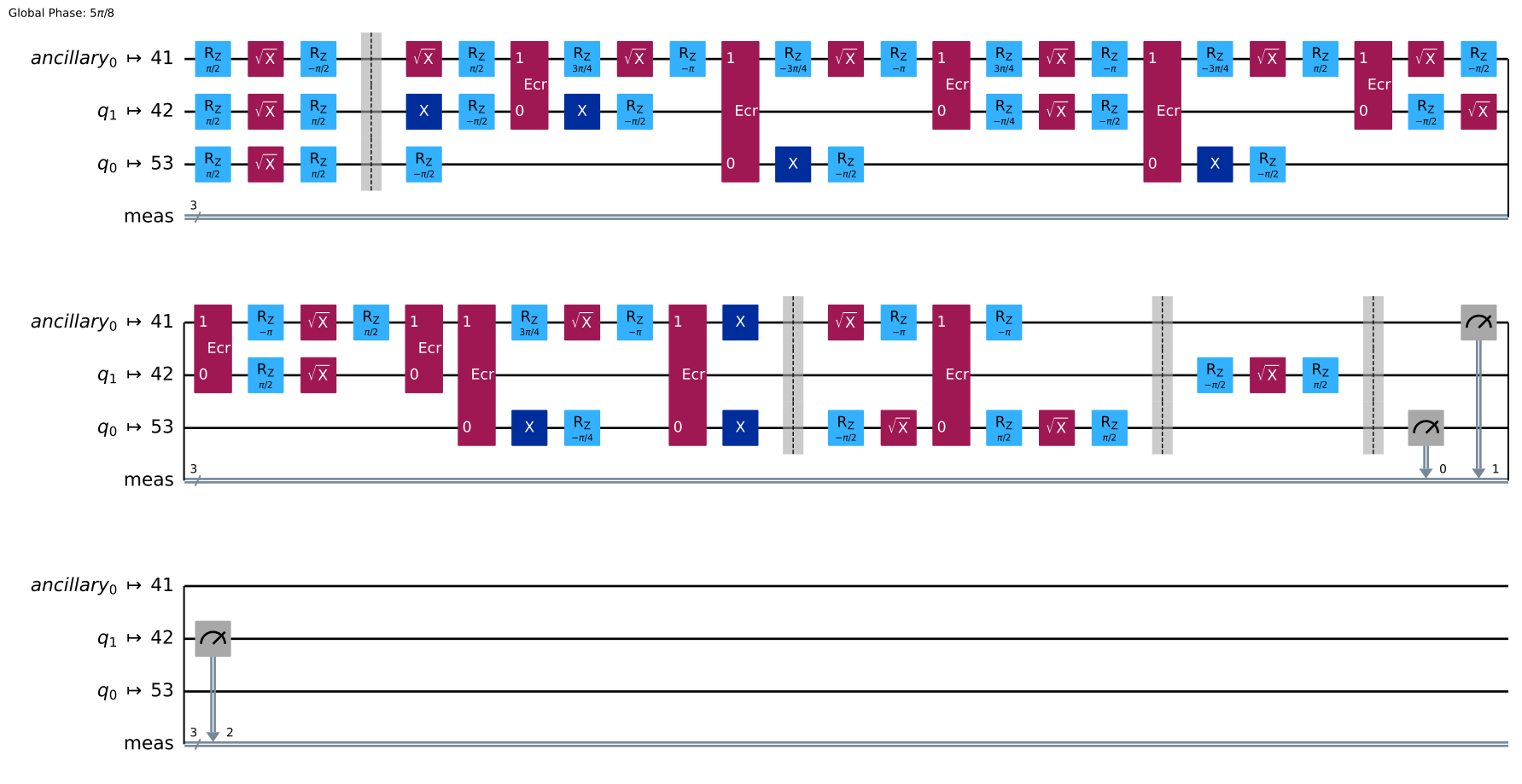
回路をトランスパイルすることで、デバイスのネイティブな基底ゲートを使用した回路に変換されました。
ステップ3:回路の実行
sampler = Sampler(real_backend)
job_real = sampler.run([target_circuit])
job_id = job_real.job_id()
print("job id:", job_id)
job id: cw69csv19rzg0080yfkg
# Check the job status
job_real.status()
'QUEUED'
# If the Notebook session got disconnected you can also check your job status
# by running the following code
job_real = service.job(job_id)  # Input your job-id between the quotations
job_real.status()
'DONE'
# Execute after job has successfully run
result_real = job_real.result()
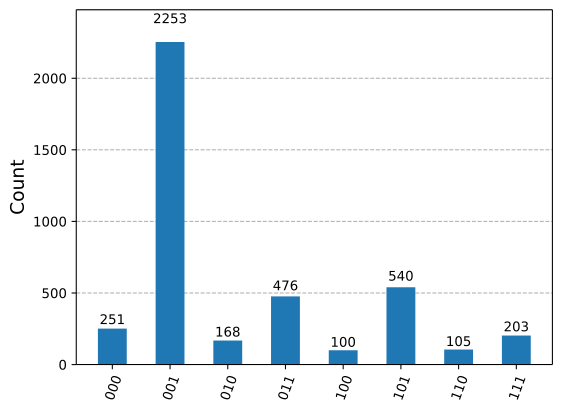
print(result_real[0].data.meas.get_counts())
{'101': 540, '001': 2253, '011': 476, '000': 251, '110': 105, '100': 100, '010': 168, '111': 203}
ステップ4:結果の後処理
plot_histogram(result_real[0].data.meas.get_counts())
4. 3量子ビットのGrover探索
では、3量子ビットのグローバー探索の例を試してみましょう。
n = 3
qr = QuantumRegister(n, "q")
anc = QuantumRegister(1, "ancilla")
grover_circuit = QuantumCircuit(qr, anc)
# the number of iterations
num_iterations = 2
def oracle(circuit):
    circuit.mcx([0, 1, 2], 3)
    circuit.barrier()
今回は、 が「正解」の状態です。
# Let's do Grover search
initialization(grover_circuit)

for i in range(0, num_iterations):
    oracle(grover_circuit)
    diffusion(grover_circuit)

# Clear the ancilla bit
grover_circuit.h(n)
grover_circuit.x(n)

grover_circuit.draw(output="mpl", idle_wires=False)

grover_circuit.measure_all()

# Define backend
backend = AerSimulator()

# Transpile to backend
pm = generate_preset_pass_manager(backend=backend, optimization_level=1)
isa_qc = pm.run(grover_circuit)

# Run the job
sampler = Sampler(backend)
job = sampler.run([isa_qc], shots=1024)
result = job.result()

# Print the results
counts = result[0].data.meas.get_counts()
print(counts)

# Plot the counts in a histogram
plot_histogram(counts)
{'0111': 977, '0100': 11, '0001': 8, '0000': 8, '0011': 5, '0010': 12, '0110': 3}
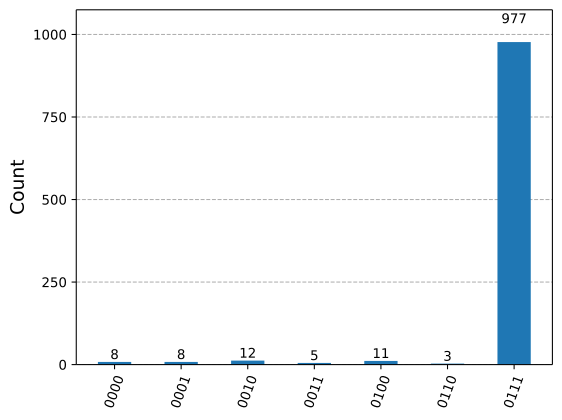
予想どおり、 が最も高い確率で観測されます。今回のケースでは2回の反復が最適です。ただし、正解を得られる確率が100%ではない点は、グローバー探索において通常のことです。
3回反復するとどうなるか?
では、3回反復してみましょう。
n = 3
qr = QuantumRegister(n, "q")
anc = QuantumRegister(1, "ancillary")
grover_circuit = QuantumCircuit(qr, anc)
# the number of iterations
num_iterations = 3
# Let's do Grover search
initialization(grover_circuit)

for i in range(0, num_iterations):
    oracle(grover_circuit)
    diffusion(grover_circuit)

# Clear the ancilla bit
grover_circuit.h(n)
grover_circuit.x(n)

grover_circuit.draw(output="mpl", idle_wires=False, fold=-1, scale=0.5)

grover_circuit.measure_all()

# Define backend
backend = AerSimulator()

# Transpile to backend
pm = generate_preset_pass_manager(backend=backend, optimization_level=1)
isa_qc = pm.run(grover_circuit)

# Run the job
sampler = Sampler(backend)
job = sampler.run([isa_qc], shots=1024)
result = job.result()

# Print the results
counts = result[0].data.meas.get_counts()
print(counts)

# Plot the counts in a histogram
plot_histogram(counts)
{'0010': 88, '0001': 103, '0000': 94, '0111': 334, '0100': 112, '0110': 106, '0101': 99, '0011': 88}
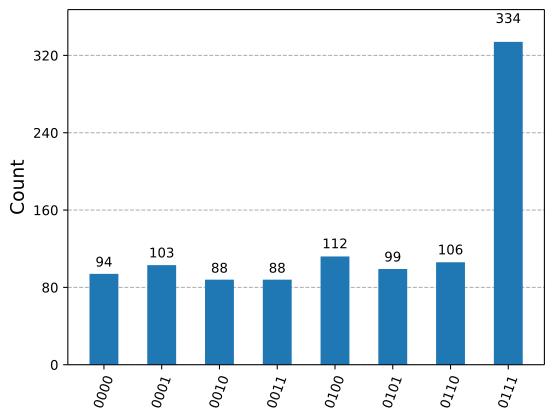
は依然として最も高い確率で観測されますが、正解を得られる確率はわずかに低下しています。
4回ではどうか?
では、4回反復してみましょう。
n = 3
qr = QuantumRegister(n, "q")
anc = QuantumRegister(1, "ancillary")
grover_circuit = QuantumCircuit(qr, anc)
# the number of iterations
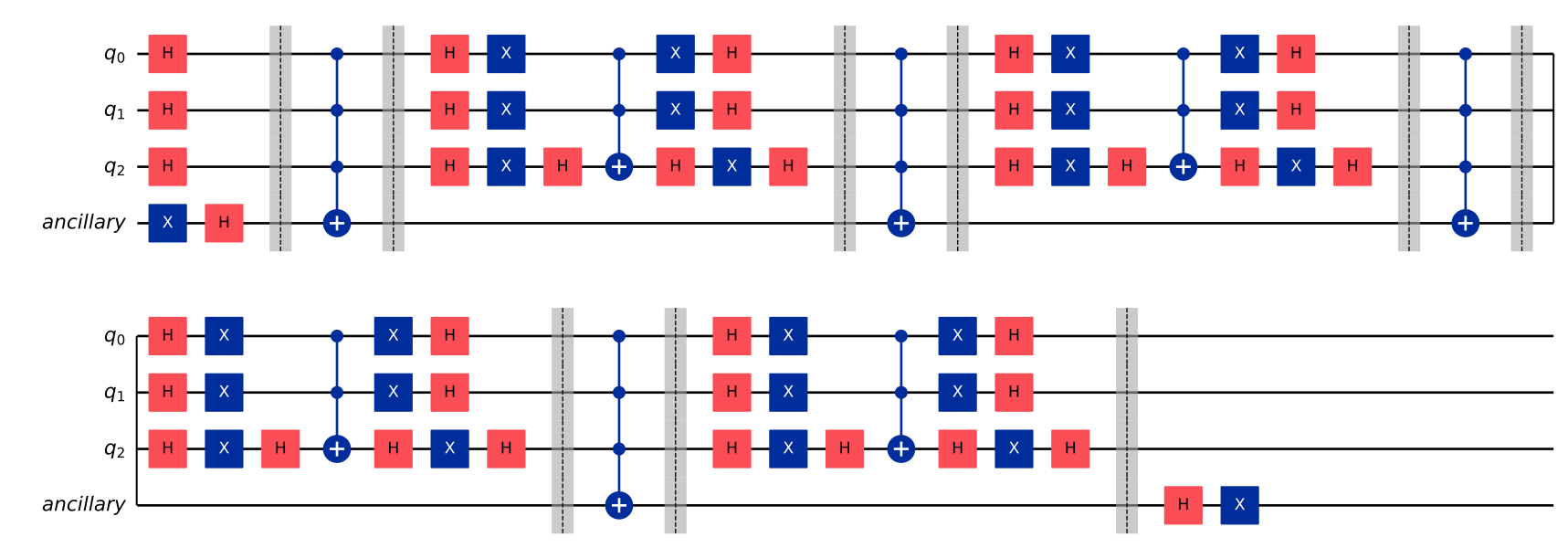
num_iterations = 4
# Let's do Grover search
initialization(grover_circuit)

for i in range(0, num_iterations):
    oracle(grover_circuit)
    diffusion(grover_circuit)

# Clear the ancilla bit
grover_circuit.h(n)
grover_circuit.x(n)

grover_circuit.draw(output="mpl", idle_wires=False, fold=-1, scale=0.5)
grover_circuit.measure_all()

# Define backend
backend = AerSimulator()

# Transpile to backend
pm = generate_preset_pass_manager(backend=backend, optimization_level=1)
isa_qc = pm.run(grover_circuit)

# Run the job
sampler = Sampler(backend)
job = sampler.run([isa_qc])
result = job.result()

# Print the results
counts = result[0].data.meas.get_counts()
print(counts)

# Plot the counts in a histogram
plot_histogram(counts)
{'0110': 127, '0000': 135, '0001': 150, '0101': 164, '0010': 153, '0011': 131, '0100': 150, '0111': 14}
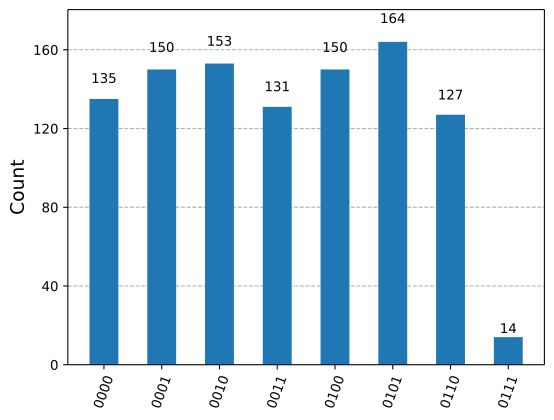
は最も低い確率で観測されるようになり、正解を得られる確率はさらに低下しています。 これは、グローバーアルゴリズムで最良の結果を得るために、反復回数を最適に選ぶことがいかに重要かを示しています。
# See the version of Qiskit
import qiskit

qiskit.__version__
'2.0.2'