パフォーマンス管理: Q-CTRL Fire Opal による Qiskit Function
API リファレンスをご覧ください
Qiskit Functions は実験的な機能であり、IBM Quantum® Premium Plan、Flex Plan、および On-Prem(IBM Quantum Platform API 経由)Plan のユーザーのみが利用できます。現在プレビュー版として提供されており、変更される可能性があります。
Package versions
このページのコードは、以下の要件を使用して開発されました。 これらのバージョン以降を使用することをお勧めします。
qiskit[all]~=2.3.1
qiskit-ibm-runtime~=0.45.1
概要
Fire Opal Performance Management を使用すると、量子ハードウェアの専門家でなくても、大規模な量子コンピューターから有意義な結果を簡単に得ることができます。Fire Opal Performance Management でCircuitを実行すると、AI を活用したエラー抑制技術が自動的に適用され、より多くのGateとQubitを使用した大規模な問題のスケーリングが可能になります。このアプローチにより、正解に到達するために必要なショット数が削減され、追加のオーバーヘッドも発生しません。その結果、計算時間とコストの両方で大幅な節約が実現します。
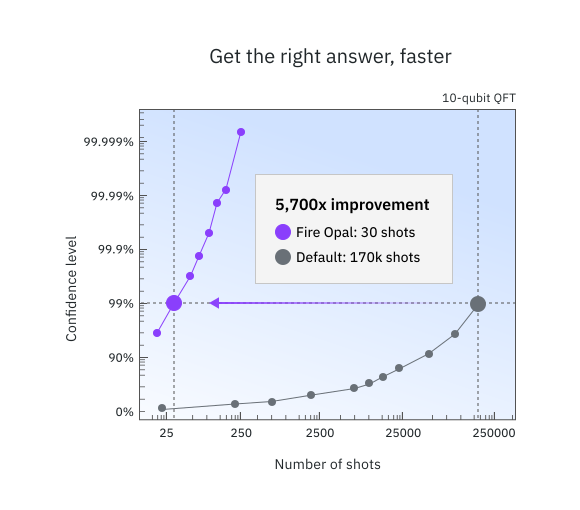
Performance Management はエラーを抑制し、ノイズの多いハードウェアで正しい答えが得られる確率を高めます。言い換えると、信号対雑音比を向上させます。次の画像は、Performance Management によって実現された精度向上により、10 qubit の量子フーリエ変換アルゴリズムの場合に追加ショットの必要性がどれほど削減されるかを示しています。わずか 30 ショットで、Q-CTRL は 99% の信頼度閾値に到達します。一方、デフォルト設定(QiskitRuntime Sampler、optimization_level=3、resilience_level=1、ibm_sherbrooke)では 170,000 ショットが必要です。正しい答えをより早く得ることで、計算ランタイムを大幅に節約できます。
Performance Management 関数はあらゆるアルゴリズムに使用でき、標準的な IBM Quantum プリミティブの代わりに簡単に利用できます。内部では、複数のエラー抑制技術が連携して実行時のエラー発生を防ぎます。Fire Opal のパイプラインメソッドはすべて事前設定済みでアルゴリズムに依存しないため、常に最高のパフォーマンスをすぐに発揮できます。
Performance Management へのアクセスを取得するには、Q-CTRL にお問い合わせください。
説明
Fire Opal Performance Management には、IBM Quantum プリミティブと同様の 2 つの実行オプションがあり、Q-CTRL の Sampler と Estimator に簡単に切り替えることができます。Performance Management 関数を使用する際の一般的なワークフローは次のとおりです。
- Circuit を定義する(Estimator の場合はオペレーターも定義する)。
- Circuit を実行する。
- 結果を取得する。
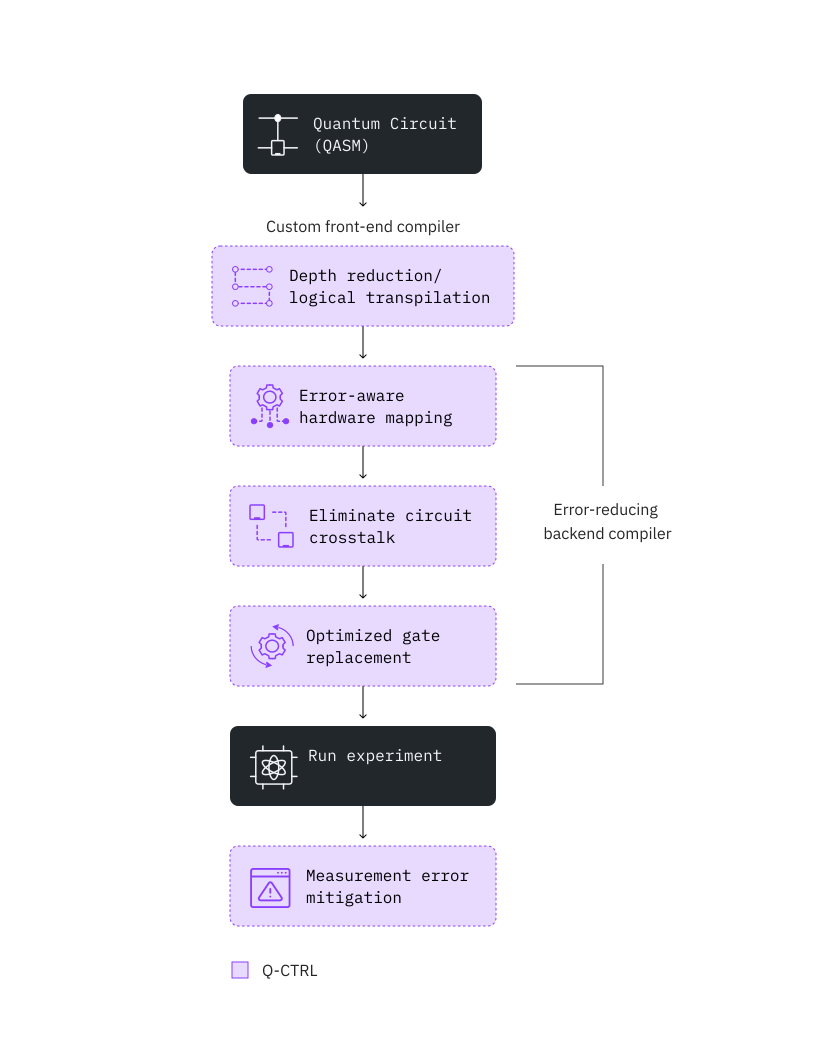
ハードウェアのノイズを低減するために、Fire Opal は以下の画像に示すような AI を活用したエラー抑制技術を幅広く採用しています。Fire Opal では、パイプライン全体が完全に自動化されており、設定は一切不要です。
Fire Opal のパイプラインは、量子ランタイムの増加や余分な物理 qubit など、追加のオーバーヘッドの必要性を排除します。ただし、古典的な処理時間は依然として考慮すべき要素です(推定値については ベンチマーク セクションを参照してください。「Total time」は古典的および量子的な処理の両方を反映しています)。サンプリングの形でオーバーヘッドを必要とするエラー軽減とは対照的に、Fire Opal のエラー抑制は Gate レベルとパルスレベルの両方で機能し、さまざまなノイズの発生源に対処してエラーが発生する可能性を防ぎます。エラーを防ぐことで、コストのかかる後処理の必要性が排除されます。
次の画像は、Fire Opal Performance Management によって自動化されるエラー抑制手法を示しています。
この関数は Sampler と Estimator の 2 つのプリミティブを提供しており、両方の入力と出力は IBM Quantum V2 プリミティブの実装仕様を拡張しています。
ベンチマーク
公開されたアルゴリズムベンチマークの結果は、Bernstein-Vazirani、量子フーリエ変換、Grover の探索、量子近似最適化アルゴリズム、変分量子固有値ソルバーなど、さまざまなアルゴリズムにわたる大幅な性能向上を示しています。このセクションの残りの部分では、実行できるアルゴリズムの種類と、期待されるパフォーマンスおよびランタイムについて詳しく説明します。
以下の独立した研究は、Q-CTRL の Performance Management が記録的な規模でのアルゴリズム研究を可能にすることを示しています:
- Parametrized Energy-Efficient Quantum Kernels for Network Service Fault Diagnosis — 最大 50 qubit の量子カーネル学習
- Tensor-based quantum phase difference estimation for large-scale demonstration — 最大 33 qubit の量子位相推定
- Hierarchical Learning for Quantum ML: Novel Training Technique for Large-Scale Variational Quantum Circuits — 最大 21 qubit の量子データローディング
以下の表は、ibm_fez での過去のベンチマーク実行から得られた精度とランタイムの概算ガイドを提供しています。他のデバイスでのパフォーマンスは異なる場合があります。使用時間は Circuit あたり 10,000 ショットを前提としています。「qubit 数」はハードの制限ではなく、非常に一貫したソリューション精度が期待できるおおよその閾値を表しています。より大きな問題サイズも正常に解決されており、これらの限界を超えたテストも推奨されています。
| 例 | qubit 数 | 精度 | 精度の指標 | 総時間 (秒) | ランタイム使用量 (秒) | プリミティブ(モード) |
|---|---|---|---|---|---|---|
| Bernstein–Vazirani | 50Q | 100% | 成功率(正しい答えが最も多いビット文字列となった実行の割合) | 10 | 8 | Sampler |
| 量子フーリエ変換 | 30Q | 100% | 成功率(正しい答えが最も多いビット文字列となった実行の割合) | 10 | 8 | Sampler |
| 量子位相推定 | 30Q | 99.9998% | 求められた角度の精度: 1- abs(real_angle - angle_found)/pi | 10 | 8 | Sampler |
| 量子シミュレーション: Ising モデル(15 ステップ) | 20Q | 99.775% | (以下で定義) | 60(ステップあたり) | 15(ステップあたり) | Estimator |
| 量子シミュレーション 2: 分子動力学(20 タイムポイント) | 34Q | 96.78% | (以下で定義) | 10(タイムポイントあたり) | 6(タイムポイントあたり) | Estimator |
期待値の測定精度の定義 — 指標 は次のように定義されます:
ここで、 = 理想的な期待値、 = 測定された期待値、 = 理想的な最大値、 = 理想的な最小値です。 は単純に複数の測定にわたる の値の平均です。
この指標は、得られる値の範囲におけるグローバルなシフトやスケーリングに対して不変であるため使用されています。言い換えると、可能な期待値の範囲を上下にシフトしたり広げたりしても、 の値は一定のままであるべきです。
始め方
Fire Opal Performance Management は推奨バージョンである Qiskit v2.0.0 を使用します。サポートされているバージョンは Qiskit >=v2.0.0 です。
IBM Quantum Platform API キーを使用して認証し、以下のように Qiskit Function を選択します。(このスニペットは、すでにアカウントをローカル環境に保存していることを前提としています。)
# Added by doQumentation — installs the packages this notebook needs if they are missing
import importlib.util

_needed = {"matplotlib": "matplotlib", "numpy": "numpy", "qiskit": "qiskit", "qiskit_ibm_catalog": "qiskit-ibm-catalog", "qiskit_ibm_runtime": "qiskit-ibm-runtime"}
_missing = [pip for module, pip in _needed.items()
            if importlib.util.find_spec(module) is None]
# One at a time, so a package that fails to install does not block the others
for _pip in _missing:
    %pip install -q {_pip}
if not _missing:
    print("\u2713 All required packages are installed")
# This cell is hidden from users. It hides the "...You have imported samplomatic..." warning.
import warnings

warnings.filterwarnings("ignore", message=".*You have imported samplomatic*")
from qiskit_ibm_catalog import QiskitFunctionsCatalog

catalog = QiskitFunctionsCatalog(channel="ibm_quantum_platform")

# verify that you have access to the function
catalog.list()
[QiskitFunction(qunova/hivqe-chemistry),
 QiskitFunction(global-data-quantum/quantum-portfolio-optimizer),
 QiskitFunction(algorithmiq/tem),
 QiskitFunction(qedma/qesem),
 QiskitFunction(multiverse/singularity),
 QiskitFunction(ibm/circuit-function),
 QiskitFunction(q-ctrl/optimization-solver),
 QiskitFunction(colibritd/quick-pde),
 QiskitFunction(q-ctrl/performance-management),
 QiskitFunction(kipu-quantum/iskay-quantum-optimizer)]
# Access Function
perf_mgmt = catalog.load("q-ctrl/performance-management")
この関数が現在サポートしていない Backend を使用したい場合は、Q-CTRL にお問い合わせしてサポートの追加をリクエストしてください。
Estimator プリミティブ
Estimator の使用例
Fire Opal Performance Management の Estimator プリミティブを使用して、単一の Circuit とオブザーバブルのペアの期待値を求めます。
qiskit-ibm-catalog パッケージと qiskit パッケージに加えて、この例を実行するには numpy パッケージも必要です。IPython カーネルを使用するノートブックでこの例を実行している場合は、次のセルのコメントを解除してパッケージをインストールできます。
# %pip install numpy
1. Circuit を作成する
例として、ランダムなエルミート演算子と、Performance Management 関数に入力するオブザーバブルを生成します。
import numpy as np
from qiskit.circuit.library import iqp
from qiskit.quantum_info import random_hermitian, SparsePauliOp

n_qubits = 50

# Generate a random circuit
mat = np.real(random_hermitian(n_qubits, seed=1234))
circuit = iqp(mat)
circuit.measure_all()

# Define observables as a string
observable = SparsePauliOp("Z" * n_qubits)
# Create PUB tuple
estimator_pubs = [(circuit, observable)]
2. Circuit を実行する
Circuit を実行し、必要に応じてバックエンドとショット数を定義します。
# This cell is hidden from users
from qiskit_ibm_runtime import QiskitRuntimeService

service = QiskitRuntimeService()
backend_name = service.least_busy().name
# Run the circuit using Estimator
qctrl_estimator_job = perf_mgmt.run(
    primitive="estimator",
    pubs=estimator_pubs,
    backend_name=backend_name,
)
おなじみの Qiskit Serverless API を使用して、Qiskit Function ワークロードのステータスを確認できます:
qctrl_estimator_job.status()
'QUEUED'
3. 結果を取得する
# Retrieve the counts from the result list
result = qctrl_estimator_job.result()
結果は Estimator の結果と同じ形式です:
import numpy

result_str = str(result)

with numpy.printoptions(threshold=200):
    print(
        f"The result of the submitted job had {len(result)} PUB "
        f"and has a value:\n {result[0]}\n"
    )

print("The associated PubResult of this job has the following DataBins:")
print(f"{result[0].data}\n")

print(f"And this DataBin has attributes: {result[0].data.keys()}")

print("The expectation values measured from this PUB are:")
print(f"{result[0].data.evs}")
The result of the submitted job had 1 PUB
The result of the submitted job had 1 PUB and has a value:
 PubResult(data=DataBin(evs=0.0195, stds=0.9998098569228051), metadata={'precision': None})

The associated PubResult of this job has the following DataBins:
DataBin(evs=0.0195, stds=0.9998098569228051)

And this DataBin has attributes: dict_keys(['evs', 'stds'])
The expectation values measured from this PUB are:
0.0195
Sampler プリミティブ
Sampler の使用例
Fire Opal Performance Management の Sampler プリミティブを使用して、Bernstein–Vazirani 回路を実行します。このアルゴリズムはブラックボックス関数の出力から隠しビット列を見つけるもので、正解が一意に定まるため、ベンチマークによく使われるアルゴリズムです。 1. Circuit を作成する
アルゴリズムの正解、隠しビット列、および Bernstein–Vazirani Circuit を定義します。circuit_width を変更するだけで、Circuit の幅を調整できます。
import qiskit

circuit_width = 35
hidden_bitstring = "1" * circuit_width

# Create circuit, reserving one qubit for BV oracle
bv_circuit = qiskit.QuantumCircuit(circuit_width + 1, circuit_width)
bv_circuit.x(circuit_width)
bv_circuit.h(range(circuit_width + 1))
for input_qubit, bit in enumerate(reversed(hidden_bitstring)):
    if bit == "1":
        bv_circuit.cx(input_qubit, circuit_width)
bv_circuit.barrier()
bv_circuit.h(range(circuit_width + 1))
bv_circuit.barrier()
for input_qubit in range(circuit_width):
    bv_circuit.measure(input_qubit, input_qubit)

# Create PUB tuple
sampler_pubs = [(bv_circuit,)]
2. Circuit を実行する
Circuit を実行し、必要に応じてバックエンドとショット数を定義します。
# Run the circuit using Sampler
qctrl_sampler_job = perf_mgmt.run(
    primitive="sampler",
    pubs=sampler_pubs,
    backend_name=backend_name,
)
Qiskit Function ワークロードのステータスを確認するか、次のように結果を返します。
# Print the ID so you can use it later, if necessary
print(qctrl_sampler_job.job_id)

qctrl_sampler_job.status()
60fe2fa1-a860-43e4-8615-c6ac4180f93b
'QUEUED'
3. 結果を取得する
# Retrieve the job results
sampler_result = qctrl_sampler_job.result()
# Get results for the first (and only) PUB
pub_result = sampler_result[0]
counts = pub_result.data.c.get_counts()

print("Counts for the meas output register (limited to 30 results):")
for i, (bitstring, count) in enumerate(counts.items()):
    if i >= 50:
        print(f"  ... ({len(counts) - 30} more items)")
        break
    print(f"  {bitstring}: {count}")
Counts for the meas output register (limited to 30 results):
  11111111111111111111111111111111111: 1661
  11111111111111111111111111110111111: 60
  11111111111111111111111111111101111: 54
  11111111111111111111111111111110111: 54
  11111111111111011111111111111111111: 46
  11111111111111111110111111111111111: 44
  11111111111111111111111101111111111: 42
  11111111111111111111111110111111111: 42
  11111111111111110111111111111111111: 41
  11111111111111111111111111111111101: 39
  11111111111111111111101111111111111: 38
  11111111111111111111110111111111111: 38
  11111111111111111111111111101111111: 37
  11111111111111111111111111111111110: 36
  11111111111110111111111111111111111: 35
  11111111111111111111111111111011111: 32
  11111111111111101111111111111111111: 32
  01111111111111111111111111111111111: 27
  11111111111111111011111111111111111: 23
  11111111101111111111111111111111111: 22
  11111111111111111111111111111111011: 21
  11111111011111111111111111111111111: 20
  00000000000000011111111111111111111: 18
  11111111111111111111110101111111111: 18
  00000001111111111111111111111111111: 17
  11111111001111111111111111111111111: 16
  11101111111111111111111111111111111: 16
  11111111111101111111111111111111111: 16
  00000101111111111111111111111111111: 13
  11111111111111111111111011111111111: 13
  11111111111111111111111110101111111: 13
  11111111111111111101111111111111111: 12
  10111111111111111111111111111111111: 12
  11111111111111111111111110001111111: 12
  00000000000000000011111111111111111: 11
  11111111111111111111111111111110110: 10
  00000000000000000000000001111111111: 10
  11111111111011111111111111111111111: 9
  11111111111111101011111111111111111: 9
  00000000011111111111111111111111111: 8
  10101111111111111111111111111111111: 8
  00000000000000000000000001011111111: 8
  11111111111111111111111111111111001: 8
  00000111111111111111111111111111111: 7
  11111111111111111111111111111101110: 7
  11111111110111111111111111111111111: 7
  00000000000001011111111111111111111: 6
  00000000000000001111111111111111111: 6
  00000000000000000001011111111111111: 6
  11111111111111111111111111011111111: 6
  ... (1050 more items)
3. 上位のビット列をプロットする
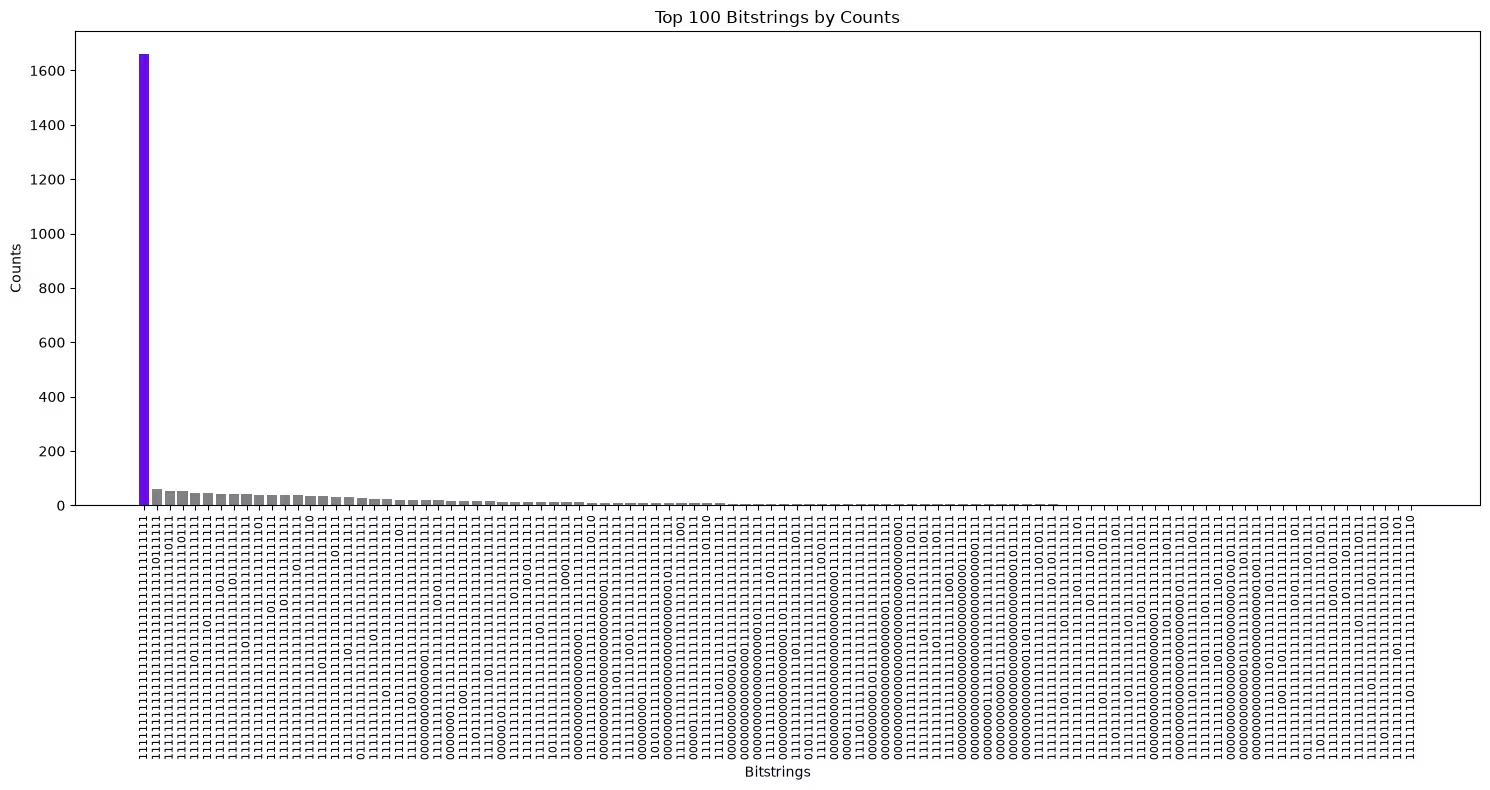
隠しビット列が最頻値であったかどうかを確認するため、カウント数が最も多いビット列をプロットします。
import matplotlib.pyplot as plt

def plot_top_bitstrings(counts_dict, hidden_bitstring=None):
    # Sort and take the top 100 bitstrings
    top_100 = sorted(counts_dict.items(), key=lambda x: x[1], reverse=True)[
        :100
    ]
    if not top_100:
        print("No bitstrings found in the input dictionary.")
        return

    # Unzip the bitstrings and their counts
    bitstrings, counts = zip(*top_100)

    # Assign colors: purple if the bitstring matches hidden_bitstring,
    # otherwise gray
    colors = [
        "#680CE9" if bit == hidden_bitstring else "gray" for bit in bitstrings
    ]

    # Create the bar plot
    plt.figure(figsize=(15, 8))
    plt.bar(
        range(len(bitstrings)), counts, tick_label=bitstrings, color=colors
    )

    # Rotate the bitstrings for better readability
    plt.xticks(rotation=90, fontsize=8)
    plt.xlabel("Bitstrings")
    plt.ylabel("Counts")
    plt.title("Top 100 Bitstrings by Counts")

    # Show the plot
    plt.tight_layout()
    plt.show()
隠しビット列は紫色でハイライトされており、カウント数が最も多いビット列であるはずです。
plot_top_bitstrings(counts, hidden_bitstring)
変更履歴
-
2026-02-20: 非推奨のお知らせ -
provider_job_idsメタデータ・フィールドは、バージョン 0.13.0 で 30 日後に非推奨となります。ユーザーは runtime service のjob_id()メソッドを通じてジョブ ID にアクセスできます。 -
2026-02-11:
ibm_miamiのサポートを追加し、PubResultに実行メタデータを追加しました。
サポートを受ける
ご質問や問題がある場合は、Q-CTRL にお問い合わせください。
次のステップ
-
Q-CTRL Performance Management へのアクセスをリクエストする。
-
この Qiskit Function の API リファレンスを参照する。
-
Q-CTRL の Qiskit Functions を使った量子位相推定チュートリアルを試す
-
ブログを参照:SoftBank Corp, 量子機械学習を用いた通信サービス障害診断システムの実証実験, 2024年8月30日.
-
ケーススタディを参照:Mitsubishi Chemical Corp のケーススタディ.
-
ケーススタディを参照:Redacted bank のケーススタディ.
-
ケーススタディを参照:BlueQubit のケーススタディ.