プリミティブの入力と出力
パッケージのバージョン
このページのコードは、以下の要件を使用して開発されました。 これらのバージョン以降を使用することをお勧めします。
qiskit[all]~=2.5.2
このページでは、Qiskit SDKプリミティブの入力と出力の概要を説明します。これらのプリミティブでは、**Primitive Unified Bloc (PUB)**として知られるデータ構造を使用して、ベクトル化されたワークロードを効率的に定義できます。これらのPUBは、ワークロード実行の基本的な作業単位です。これらは、定義されたワークロードをジョブとして実行するSamplerおよびEstimatorプリミティブのrun()メソッドへの入力として使用されます。その後、ジョブが完了すると、使用されたPUBと指定されたオプションに依存する形式で結果が返されます。
PUBの概要
プリミティブのrun()メソッドを呼び出す際、必須の引数は1つ以上のタプルからなるlistで、それぞれのタプルがプリミティブによって実行される各回路に対応します。各タプルはPUBとみなされ、リスト内の各タプルに必要な要素は使用するプリミティブによって異なります。各タプルに与えるデータは、ブロードキャストによりワークロードの柔軟性を高めるため、さまざまな形状に配置することができます。ブロードキャストのルールについては後述のセクションで説明します。
Estimator PUB
Estimator プリミティブの場合、PUB の形式には最大4つの値を含めることができます。
- 1つ以上の
Parameterオブジェクトを含む可能性がある単一のQuantumCircuit - 推定する期待値を指定する1つ以上のオブザーバブルのリスト。これらは配列に配置されます(たとえば、単一のオブザーバブルは0次元配列として、オブザーバブルのリストは1次元配列として表されます)。データは、
Pauli、SparsePauliOp、PauliList、strなどのObservablesArrayLike形式のいずれかにできます。備考異なる PUB 内に同じ Circuit を持つ2つの可換なオブザーバブルがある場合、それらは同じ測定を使用して推定されません。各 PUB は測定のための異なる基底を表すため、PUB ごとに別々の測定が必要になります。可換なオブザーバブルが同じ測定を使用して推定されるようにするには、それらを同じ PUB 内にグループ化する必要があります。
- Circuit をバインドするためのパラメーター値のコレクション。これは、最後のインデックスが Circuit の
Parameterオブジェクトに対応する単一の配列様オブジェクトとして指定できます。また、Circuit にParameterオブジェクトがない場合は省略する(あるいは同等にNoneに設定する)ことができます。 - (オプションで)推定する期待値の目標精度
Sampler PUB
Sampler プリミティブの場合、PUB タプルの形式には最大3つの値が含まれます。
- 1つの
QuantumCircuit。1つ以上のParameterオブジェクトを含めることもできます。 注意:これらの回路には、サンプリング対象の各Qubitに対する測定命令を必ず含めなければなりません。 - 回路にバインドするパラメータ値のコレクション (実行時にバインドする必要がある
Parameterオブジェクトがある場合のみ必要) - (任意)回路を測定するショット数
以下のコードは、Estimatorプリミティブへのベクトル化された入力のセット例を示しています。
# Added by doQumentation — installs the packages this notebook needs if they are missing
import importlib.util

_needed = {"numpy": "numpy", "qiskit": "qiskit"}
_missing = [pip for module, pip in _needed.items()
            if importlib.util.find_spec(module) is None]
# One at a time, so a package that fails to install does not block the others
for _pip in _missing:
    %pip install -q {_pip}
if not _missing:
    print("\u2713 All required packages are installed")
from qiskit.circuit import (
    Parameter,
    QuantumCircuit,
    ClassicalRegister,
    QuantumRegister,
)
from qiskit.transpiler import generate_preset_pass_manager
from qiskit.quantum_info import SparsePauliOp
from qiskit.primitives.containers import BitArray
from qiskit.primitives import StatevectorEstimator

import numpy as np

# Define a circuit with two parameters.
circuit = QuantumCircuit(2)
circuit.h(0)
circuit.cx(0, 1)
circuit.ry(Parameter("a"), 0)
circuit.rz(Parameter("b"), 0)
circuit.cx(0, 1)
circuit.h(0)

# Transpile the circuit without providing a backend
pm = generate_preset_pass_manager(optimization_level=1)
transpiled_circuit = pm.run(circuit)
layout = transpiled_circuit.layout

# Now define a sweep over parameter values, the last axis of dimension 2 is
# for the two parameters "a" and "b"
params = np.vstack(
    [
        np.linspace(-np.pi, np.pi, 10),
        np.linspace(-4 * np.pi, 4 * np.pi, 10),
    ]
).T

# Define three observables. The inner length-1 lists cause this array of
# observables to have shape (3, 1), rather than shape (3,) if they were
# omitted.
observables = [
    [SparsePauliOp(["XX", "IY"], [0.5, 0.5])],
    [SparsePauliOp("XX")],
    [SparsePauliOp("IY")],
]
# Apply the same layout as the transpiled circuit.
observables = [
    [observable.apply_layout(layout) for observable in observable_set]
    for observable_set in observables
]

# Estimate the expectation value for all 300 combinations of observables
# and parameter values, where the pub result will have shape (3, 100).
#
# This shape is due to our array of parameter bindings having shape
# (100, 2), combined with our array of observables having shape (3, 1).
estimator = StatevectorEstimator()
estimator_pub = (transpiled_circuit, observables, params)

# Run the transpiled circuit
# using the set of parameters and observables.

job = estimator.run([estimator_pub])
result = job.result()
ブロードキャストのルール
PUBは複数の配列(オブザーバブルとパラメータ値)の要素をNumPyと同じブロードキャストのルールに従って集約します。このセクションではそれらのルールを簡単にまとめます。詳細についてはNumPyブロードキャストルールのドキュメントを参照してください。
ルール:
-
入力配列は同じ次元数である必要はありません。
-
結果の配列は、最も大きい次元数を持つ入力配列と同じ次元数になります。
-
各次元のサイズは、対応する次元の最大サイズになります。
-
存在しない次元はサイズ1とみなされます。
-
-
形状の比較は右端の次元から始まり、左方向に進みます。
-
2つの次元は、それらのサイズが等しいか、一方が1である場合に互換性があります。
ブロードキャスト可能な配列ペアの例:
A1     (1d array):      1
A2     (2d array):  3 x 5
Result (2d array):  3 x 5

A1     (3d array):  11 x 2 x 7
A2     (3d array):  11 x 1 x 7
Result (3d array):  11 x 2 x 7
ブロードキャスト不可能な配列ペアの例:
A1     (1d array):  5
A2     (1d array):  3

A1     (2d array):      2 x 1
# The following would work if the middle dimension were 2,
# instead of 5.
A2     (3d array):  6 x 5 x 4
Estimatorはブロードキャストされた形状の各要素に対して1つの期待値の推定値を返します。
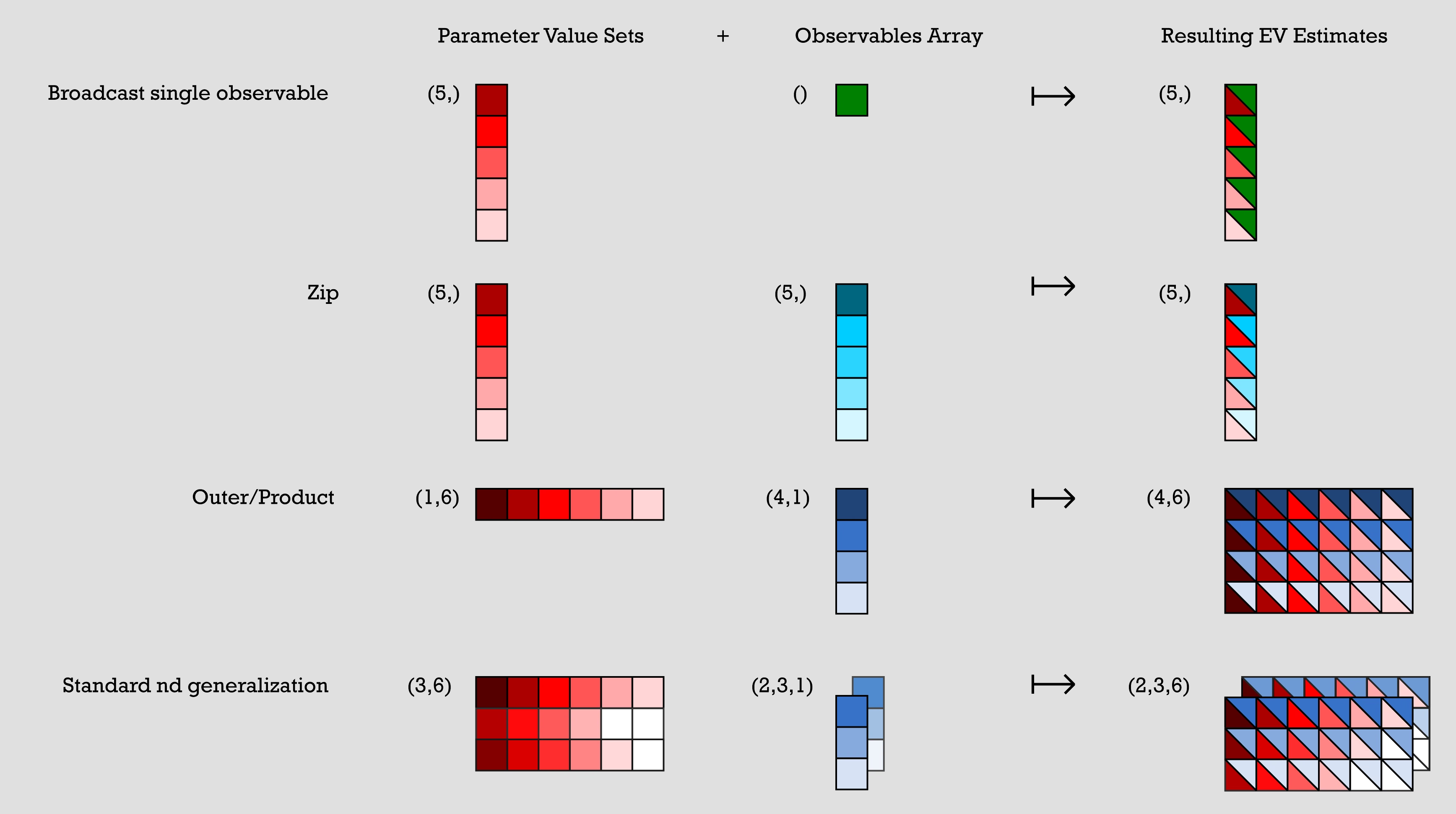
以下に、配列のブロードキャストで表現した一般的なパターンの例を示します。それらの視覚的な表現はこの後の図に示されています。
パラメータ値セットは n x m の配列で表され、オブザーバブル配列は1つ以上の単一列配列で表されます。前のコードの各例では、パラメータ値セットとオブザーバブル配列を組み合わせて期待値の推定値を作成しています。
-
例1(単一オブザーバブルのブロードキャスト):パラメータ値セットが5x1の配列で、オブザーバブル配列が1x1です。オブザーバブル配列の1つの要素がパラメータ値セットの各要素と組み合わされ、5x1の配列が生成されます。各要素は、パラメータ値セットの元の要素とオブザーバブル配列の要素の組み合わせです。
-
例2(zip):5x1のパラメータ値セットと5x1のオブザーバブル配列があります。出力は5x1の配列で、各要素はパラメータ値セットのn番目の要素とオブザーバブル配列のn番目の要素の組み合わせです。
-
例3(外積/積):1x6のパラメータ値セットと4x1のオブザーバブル配列があります。これらを組み合わせると4x6の配列が作成され、パラメータ値セットの各要素がオブザーバブル配列のすべての要素と組み合わされます。そのため、各パラメータ値は出力の1列全体になります。
-
例4(標準的なnd一般化):3x6のパラメータ値セット配列と2つの3x1のオブザーバブル配列があります。これらを組み合わせると、前の例と同様の方法で2つの3x6の出力配列が作成されます。
# Broadcast single observable
parameter_values = np.random.uniform(size=(5,))  # shape (5,)
observables = SparsePauliOp("ZZZ")  # shape ()
# >> pub result has shape (5,)

# Zip
parameter_values = np.random.uniform(size=(5,))  # shape (5,)
observables = [
    SparsePauliOp(pauli) for pauli in ["III", "XXX", "YYY", "ZZZ", "XYZ"]
]  # shape (5,)
# >> pub result has shape (5,)

# Outer/Product
parameter_values = np.random.uniform(size=(1, 6))  # shape (1, 6)
observables = [
    [SparsePauliOp(pauli)] for pauli in ["III", "XXX", "YYY", "ZZZ"]
]  # shape (4, 1)
# >> pub result has shape (4, 6)

# Standard nd generalization
parameter_values = np.random.uniform(size=(3, 6))  # shape (3, 6)
observables = [
    [
        [SparsePauliOp(["XII"])],
        [SparsePauliOp(["IXI"])],
        [SparsePauliOp(["IIX"])],
    ],
    [
        [SparsePauliOp(["ZII"])],
        [SparsePauliOp(["IZI"])],
        [SparsePauliOp(["IIZ"])],
    ],
]  # shape (2, 3, 1)
# >> pub result has shape (2, 3, 6)
各SparsePauliOpは、SparsePauliOpに含まれるPauliの数に関わらず、この文脈では単一の要素として数えられます。したがって、これらのブロードキャストルールの観点では、以下のすべての要素は同じ形状を持ちます。
a = SparsePauliOp("Z") # shape ()
b = SparsePauliOp("IIIIZXYIZ") # shape ()
c = SparsePauliOp.from_list(["XX", "XY", "IZ"]) # shape ()
以下の演算子のリストは、含まれる情報の観点では等価ですが、形状が異なります。
list1 = SparsePauliOp.from_list(["XX", "XY", "IZ"])
# list1 has shape ()
list2 = [SparsePauliOp("XX"), SparsePauliOp("XY"), SparsePauliOp("IZ")]
# list2 has shape (3, )
プリミティブ出力の概要
1つ以上の PUB が実行のために QPU に送信され、ジョブが正常に完了すると、データは PrimitiveResult コンテナオブジェクトとして返されます。PrimitiveResult には、各 PUB の実行結果を含む PubResult オブジェクトの反復可能なリストが含まれます。たとえば、20個の PUB で送信されたジョブは、20個の PubResults のリストを含む PrimitiveResult オブジェクトを返し、それぞれが各 PUB に対応します。
各PubResultオブジェクトはdata属性とオプションのmetadata属性を持ちます。data属性はカスタマイズされたDataBinで、Estimatorの場合は期待値の推定値、Samplerの場合は回路出力のサンプルが格納されています。
data属性には、標準偏差など実装固有のその他の情報も含まれる場合があります。metadata属性には、関連するPUBの実行に関する実装固有の追加情報が含まれる場合があります。
以下はPrimitiveResultデータ構造の概略図です:
- Estimator output
- Sampler output
└── PrimitiveResult
    ├── PubResult[0]
    │   ├── metadata
    │   └── data  ## In the form of a DataBin object,
    |       |     ## which includes data such as the following:
    │       ├── evs
    │       │   └── List of estimated expectation values in the shape
    |       |         specified by the first pub
    │       └── stds
    │           └── List of calculated standard deviations in the
    |                 same shape as above
    ├── PubResult[1]
    |   ├── metadata
    |   └── data  ## In the form of a DataBin object,
    |       |     ## which includes data such as the following:
    |       ├── evs
    |       │   └── List of estimated expectation values in the shape
    |       |        specified by the second pub
    |       └── stds
    |           └── List of calculated standard deviations in the
    |                same shape as above
    ├── ...
    ├── ...
    └── ...
上記は返される可能性のあるデータの例です。実際に返されるデータは実装によって異なります。
└── PrimitiveResult
    ├── PubResult[0]
    │   ├── metadata
    │   └── data  ## In the form of a DataBin object
    │       ├── NAME_OF_CLASSICAL_REGISTER
    │       │   └── BitArray of count data for first PUB (default is 'meas')
    |       |
    │       └── NAME_OF_ANOTHER_CLASSICAL_REGISTER
    │           └── BitArray of count data (exists only if more than one
    |                 ClassicalRegister was specified in the circuit)
    ├── PubResult[1]
    |   ├── metadata
    |   └── data  ## In the form of a DataBin object
    |       └── NAME_OF_CLASSICAL_REGISTER
    |           └── BitArray of count data for second PUB
    ├── ...
    ├── ...
    └── ...
Estimatorの出力
前述のとおり、EstimatorプリミティブのPUBに対して返されるPubResultのデータは実装によって異なります。たとえば、期待値の配列(PubResult.data.evs)と関連する標準偏差(PubResult.data.stds)が含まれる場合があります。
以下のコードスニペットは、上記で作成したジョブのPrimitiveResult(および関連するPubResult)の形式を示しています。
print(
    f"The result of the submitted job had {len(result)} PUB and "
    f"has a value:\n {result}\n"
)
print(
    f"The associated PubResult of this job has the following data bins:"
    f"\n {result[0].data}\n"
)
print(f"And this DataBin has attributes: {result[0].data.keys()}")
print(
    "Recall that this shape is due to our array of parameter binding sets "
    "having shape (100, 2) -- where 2 is the number of parameters in the circuit -- "
    "combined with our array of observables having shape (3, 1)."
)

print(
    f"The expectation values measured from this PUB are: \n{result[0].data.evs}"
)
The result of the submitted job had 1 PUB and has a value:
 PrimitiveResult([PubResult(data=DataBin(evs=np.ndarray(<shape=(3, 10), dtype=float64>), stds=np.ndarray(<shape=(3, 10), dtype=float64>), shape=(3, 10)), metadata={'target_precision': 0.0, 'circuit_metadata': {}})], metadata={'version': 2})

The associated PubResult of this job has the following data bins:
 DataBin(evs=np.ndarray(<shape=(3, 10), dtype=float64>), stds=np.ndarray(<shape=(3, 10), dtype=float64>), shape=(3, 10))

And this DataBin has attributes: dict_keys(['evs', 'stds'])
Recall that this shape is due to our array of parameter binding sets having shape (100, 2) -- where 2 is the number of parameters in the circuit -- combined with our array of observables having shape (3, 1).
The expectation values measured from this PUB are:
[[ 3.06161700e-16  4.52395120e-01  4.36594428e-01  2.16506351e-01
   6.33718361e-01 -6.33718361e-01 -2.16506351e-01 -4.36594428e-01
  -4.52395120e-01 -3.06161700e-16]
 [ 1.22464680e-16  6.42787610e-01  9.84807753e-01  8.66025404e-01
   3.42020143e-01 -3.42020143e-01 -8.66025404e-01 -9.84807753e-01
  -6.42787610e-01 -1.22464680e-16]
 [ 4.89858720e-16  2.62002630e-01 -1.11618897e-01 -4.33012702e-01
   9.25416578e-01 -9.25416578e-01  4.33012702e-01  1.11618897e-01
  -2.62002630e-01 -4.89858720e-16]]
Samplerの出力
Samplerジョブが正常に完了すると、返されるPrimitiveResultオブジェクトには、PUBごとに1つのSamplerPubResultのリストが含まれます。これらのSamplerPubResultオブジェクトのデータビンは辞書のようなオブジェクトで、回路内の各ClassicalRegisterに対して1つのBitArrayが含まれます。
BitArrayクラスは、順序付きのショットデータのコンテナです。詳しく言うと、サンプリングされたビット列をバイトとして2次元配列に格納します。この配列の左端の軸は順序付きのショットにわたって走り、右端の軸はバイトにわたって走ります。
最初の例として、次の10量子ビット回路を見てみましょう:
from qiskit.primitives import StatevectorSampler

# generate a ten-qubit GHZ circuit
circuit = QuantumCircuit(10)
circuit.h(0)
circuit.cx(range(0, 9), range(1, 10))

# append measurements with the `measure_all` method
circuit.measure_all()

# transpile the circuit
transpiled_circuit = pm.run(circuit)

sampler = StatevectorSampler()

# run the Sampler job and retrieve the results

job = sampler.run([transpiled_circuit])
result = job.result()

# the data bin contains one BitArray
data = result[0].data
print(f"Databin: {data}\n")

# to access the BitArray, use the key "meas", which is the default name of
# the classical register when this is added by the `measure_all` method
array = data.meas
print(f"BitArray: {array}\n")
print(f"The shape of register `meas` is {data.meas.array.shape}.\n")
print(f"The bytes in register `alpha`, shot by shot:\n{data.meas.array}\n")
Databin: DataBin(meas=BitArray(<shape=(), num_shots=1024, num_bits=10>))

BitArray: BitArray(<shape=(), num_shots=1024, num_bits=10>)

The shape of register `meas` is (1024, 2).

The bytes in register `alpha`, shot by shot:
[[  3 255]
 [  0   0]
 [  3 255]
 ...
 [  0   0]
 [  3 255]
 [  0   0]]
BitArrayのバイト形式からビット列に変換すると便利な場合があります。get_countメソッドは、ビット列をそれが出現した回数にマッピングする辞書を返します。
# optionally convert the native BitArray format to a dictionary format
counts = data.meas.get_counts()
print(f"Counts: {counts}")
Counts: {'1111111111': 484, '0000000000': 540}
回路に複数のクラシカルレジスタが含まれる場合、結果は異なるBitArrayオブジェクトに格納されます。次の例は、前のスニペットをクラシカルレジスタを2つの異なるレジスタに分割した形に変更したものです:
# generate a ten-qubit GHZ circuit with two classical registers
circuit = QuantumCircuit(
    qreg := QuantumRegister(10),
    alpha := ClassicalRegister(1, "alpha"),
    beta := ClassicalRegister(9, "beta"),
)
circuit.h(0)
circuit.cx(range(0, 9), range(1, 10))

# append measurements with the `measure_all` method
circuit.measure([0], alpha)
circuit.measure(range(1, 10), beta)

# transpile the circuit
transpiled_circuit = pm.run(circuit)

# run the Sampler job and retrieve the results

job = sampler.run([transpiled_circuit])
result = job.result()

# the data bin contains two BitArrays, one per register, and can be accessed
# as attributes using the registers' names
data = result[0].data
print(f"BitArray for register 'alpha': {data.alpha}")
print(f"BitArray for register 'beta': {data.beta}")
BitArray for register 'alpha': BitArray(<shape=(), num_shots=1024, num_bits=1>)
BitArray for register 'beta': BitArray(<shape=(), num_shots=1024, num_bits=9>)
高性能な後処理のためのBitArrayオブジェクトの活用
一般的に配列は辞書よりもパフォーマンスに優れているため、カウント数の辞書ではなくBitArrayオブジェクトに対して直接後処理を行うことが推奨されます。BitArrayクラスは、一般的な後処理操作を行うためのさまざまなメソッドを提供しています:
print(f"The shape of register `alpha` is {data.alpha.array.shape}.")
print(f"The bytes in register `alpha`, shot by shot:\n{data.alpha.array}\n")

print(f"The shape of register `beta` is {data.beta.array.shape}.")
print(f"The bytes in register `beta`, shot by shot:\n{data.beta.array}\n")

# post-select the bitstrings of `beta` based on having sampled "1" in `alpha`
mask = data.alpha.array == "0b1"
ps_beta = data.beta[mask[:, 0]]
print(f"The shape of `beta` after post-selection is {ps_beta.array.shape}.")
print(f"The bytes in `beta` after post-selection:\n{ps_beta.array}")

# get a slice of `beta` to retrieve the first three bits
beta_sl_bits = data.beta.slice_bits([0, 1, 2])
print(
    f"The shape of `beta` after bit-wise slicing is {beta_sl_bits.array.shape}."
)
print(f"The bytes in `beta` after bit-wise slicing:\n{beta_sl_bits.array}\n")

# get a slice of `beta` to retrieve the bytes of the first five shots
beta_sl_shots = data.beta.slice_shots([0, 1, 2, 3, 4])
print(
    f"The shape of `beta` after shot-wise slicing is {beta_sl_shots.array.shape}."
)
print(
    f"The bytes in `beta` after shot-wise slicing:\n{beta_sl_shots.array}\n"
)

# calculate the expectation value of diagonal operators on `beta`
ops = [SparsePauliOp("ZZZZZZZZZ"), SparsePauliOp("IIIIIIIIZ")]
exp_vals = data.beta.expectation_values(ops)
for o, e in zip(ops, exp_vals):
    print(f"Exp. val. for observable `{o}` is: {e}")

# concatenate the bitstrings in `alpha` and `beta` to "merge" the results
# of the two registers
merged_results = BitArray.concatenate_bits([data.alpha, data.beta])
print(f"\nThe shape of the merged results is {merged_results.array.shape}.")
print(f"The bytes of the merged results:\n{merged_results.array}\n")
The shape of register `alpha` is (1024, 1).
The bytes in register `alpha`, shot by shot:
[[1]
 [1]
 [0]
 ...
 [1]
 [0]
 [1]]

The shape of register `beta` is (1024, 2).
The bytes in register `beta`, shot by shot:
[[  1 255]
 [  1 255]
 [  0   0]
 ...
 [  1 255]
 [  0   0]
 [  1 255]]

The shape of `beta` after post-selection is (0, 2).
The bytes in `beta` after post-selection:
[]
The shape of `beta` after bit-wise slicing is (1024, 1).
The bytes in `beta` after bit-wise slicing:
[[7]
 [7]
 [0]
 ...
 [7]
 [0]
 [7]]

The shape of `beta` after shot-wise slicing is (5, 2).
The bytes in `beta` after shot-wise slicing:
[[  1 255]
 [  1 255]
 [  0   0]
 [  0   0]
 [  1 255]]

Exp. val. for observable `SparsePauliOp(['ZZZZZZZZZ'],
              coeffs=[1.+0.j])` is: -0.02734375
Exp. val. for observable `SparsePauliOp(['IIIIIIIIZ'],
              coeffs=[1.+0.j])` is: -0.02734375

The shape of the merged results is (1024, 2).
The bytes of the merged results:
[[  3 255]
 [  3 255]
 [  0   0]
 ...
 [  3 255]
 [  0   0]
 [  3 255]]
結果のメタデータ
実行結果に加えて、PrimitiveResultとPubResultオブジェクトには、送信されたジョブに関するオプションのメタデータ属性が含まれています。返されるメタデータ(ある場合)は実装固有です。
# Print out the results metadata
print("The metadata of the PrimitiveResult is:")
for key, val in result.metadata.items():
    print(f"'{key}' : {val},")

print("\nThe metadata of the PubResult result is:")
for key, val in result[0].metadata.items():
    print(f"'{key}' : {val},")
The metadata of the PrimitiveResult is:
'version' : 2,

The metadata of the PubResult result is:
'shots' : 1024,
'circuit_metadata' : {},
次のステップ
-
Qiskit SDK プリミティブ APIを確認する。
-
Qiskit Aer primitives APIを確認する。
-
IBM Quantum プリミティブについて詳しく学ぶ。
-
qiskit-ibm-runtimeEstimator APIを確認する。 -
qiskit-ibm-runtimeSampler APIを確認する。