Executor クイックスタート
パッケージ・バージョン
このページのコードは、以下の要件を使用して開発されました。 これらのバージョン以降の使用をお勧めします。
qiskit[all]~=2.5.2
qiskit-ibm-runtime~=0.47.0
samplomatic~=0.21.0
# Added by doQumentation — required packages for this notebook
!pip install -q qiskit qiskit-ibm-runtime samplomatic
Sampler プリミティブと同様に、Executor は量子回路の実行から出力レジスターをサンプリングしますが、組み込みのエラー抑制や緩和機能はありません。代わりに、指示型実行モデルの一部として、設計の意図をクライアント側でキャプチャし、コストのかかる回路バリアントの生成をサーバー側にシフトします。Executor は、回路アノテーションとオプションで指定されたディレクティブに従い、パラメーター値を生成してバインドし、バインドされた回路をハードウェア上で実行し、実行結果とメタデータを返します。暗黙的な判断は一切行わず、完全な制御と透明性を提供します。
Qiskit パッケージには、Executor プリミティブの基底クラスがまだありません。
始める前に
このページのコード例の一部では、Samplomatic パッケージの一部である samplex を使用しています。そのため、これらのコード・ブロックを実行する前に、以下のコード・ブロックに示すように Samplomatic をインストールする必要があります。詳細については、Samplomatic ドキュメントを参照してください。
pip install samplomatic

# For visualization support, include the visualization dependencies.
# pip install samplomatic[vis]
Executor プリミティブを使用するステップ
1. アカウントの初期化
IBM Quantum Compute Service はマネージド・サービスであるため、まずアカウントを初期化する必要があります。その後、期待値の計算に使用する QPU を選択できます。
アカウントをまだセットアップしていない場合は、IBM Cloud® アカウントのセットアップの手順に従ってください。
from qiskit_ibm_runtime import QiskitRuntimeService, Executor
from qiskit_ibm_runtime.quantum_program import QuantumProgram
from qiskit.circuit import QuantumCircuit
from qiskit.transpiler import generate_preset_pass_manager
from samplomatic.transpiler import generate_boxing_pass_manager
from samplomatic import build

# Initialize the service and choose a backend
service = QiskitRuntimeService()
backend = service.least_busy(operational=True, simulator=False)
print(backend)
<IBMBackend('ibm_fez')>
2. 回路の作成とトランスパイル
Executor プリミティブを使用するには、少なくとも 1 つの回路が必要です。オプションでパラメーターを持つことができます。
# Generate the circuit
circuit = QuantumCircuit(2)
circuit.h(0)
circuit.h(1)
circuit.cz(0, 1)
circuit.h(1)

# Using `measure_all` automatically creates the necessary
# classical registers.
circuit.measure_all()
回路は、QPU でサポートされている命令のみを使用するように変換する必要があります(命令セット・アーキテクチャー(ISA)回路と呼ばれます)。これにはトランスパイラーを使用します。
# Transpile the circuit
preset_pass_manager = generate_preset_pass_manager(
    backend=backend, optimization_level=0
)
isa_circuit = preset_pass_manager.run(circuit)
3. QuantumProgram の初期化
ワークロードを使用して QuantumProgram を初期化します。QuantumProgram は QuantumProgramItems で構成されています。通常、各アイテムは回路、パラメーター値のセット、およびオプションで回路の内容をランダム化する samplex で構成されます。詳細については、Executor の入力と出力を参照してください。
次のセルは QuantumProgram を初期化し、25 ショットを実行するよう指定します。次に、トランスパイルされたターゲット回路を追加します。
# Initialize an empty program
program = QuantumProgram(shots=25)

# Append the circuit to the program
program.append_circuit_item(isa_circuit)
4. オプション:ゲートと測定をアノテーション付きボックスにグループ化する
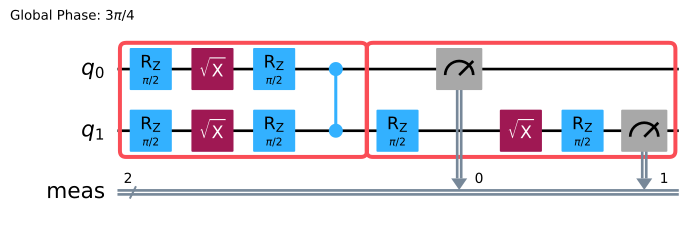
命令をボックスにグループ化してアノテーションを付けることが、意図を指定する主要な方法です。次の例では、generate_boxing_pass_manager とそのツワーリング・パラメーターを使用して、2-Qubit ゲートと測定をボックスにグループ化し、ツワーリング・アノテーションを適用します。
# Generate a boxing pass manager to group gates
# and measurements into boxes and add
# a`Twirl` annotation.
boxes_pm = generate_boxing_pass_manager(
    # Add gate twirling
    enable_gates=True,
    # Add measurement twirling
    enable_measures=True,
)

boxed_circuit = boxes_pm.run(isa_circuit)
boxed_circuit.draw("mpl", idle_wires=False)
5. オプション:テンプレート回路と samplex を作成してプログラムに追加する
次に、Samplomatic の build メソッドを使用して、テンプレート回路 と samplex のペアを生成します。テンプレート回路は元の回路と構造的に等価ですが、指定されたアノテーション(この例ではゲートと測定ツワーリング)を実装するために、シングル・Qubit ゲートがパラメーター化されたゲートに置き換えられています。samplex は、テンプレート回路のランダム化されたパラメーターを生成するために必要なすべての情報をエンコードします。
テンプレート回路と samplex ペアを生成したら、append_samplex_item メソッドを使用してペアをプログラムに追加します。
samplomatic.samplex.Samplex とその引数の詳細については、Samplomatic の API ドキュメントを参照してください。
# Build the template circuit and the samplex
template_circuit, samplex = build(boxed_circuit)

# Append the template circuit and samplex as a `samplex_item`
program.append_samplex_item(
    template_circuit,
    samplex=samplex,
    shape=(num_randomizations := 20,),
)
6. Executor の呼び出しと結果の取得
デフォルト・オプションで Executor プリミティブを使用して、IBM® バックエンドで QuantumProgram を実行します。利用可能なオプションについては、Executor オプションを参照してください。
# Initialize an Executor with the default options
executor = Executor(mode=backend)

# Submit the job
job = executor.run(program)
job
<RuntimeJobV2('dab7lcrvpcac73ddek40', 'executor')>
# Retrieve the result
result = job.result()
結果は QuantumProgramResult 型です。結果オブジェクトについては、Executor の入力と出力を参照してください。
次のステップ
- Executor の例を試してみてください。
- Executor の入力と出力を理解します。
- Executor ブロードキャスト・セマンティクスについて学びます。